QuickBrowser intercepts every link click on macOS and routes it to the correct browser instantly. Set rules once, forget about choosing forever.
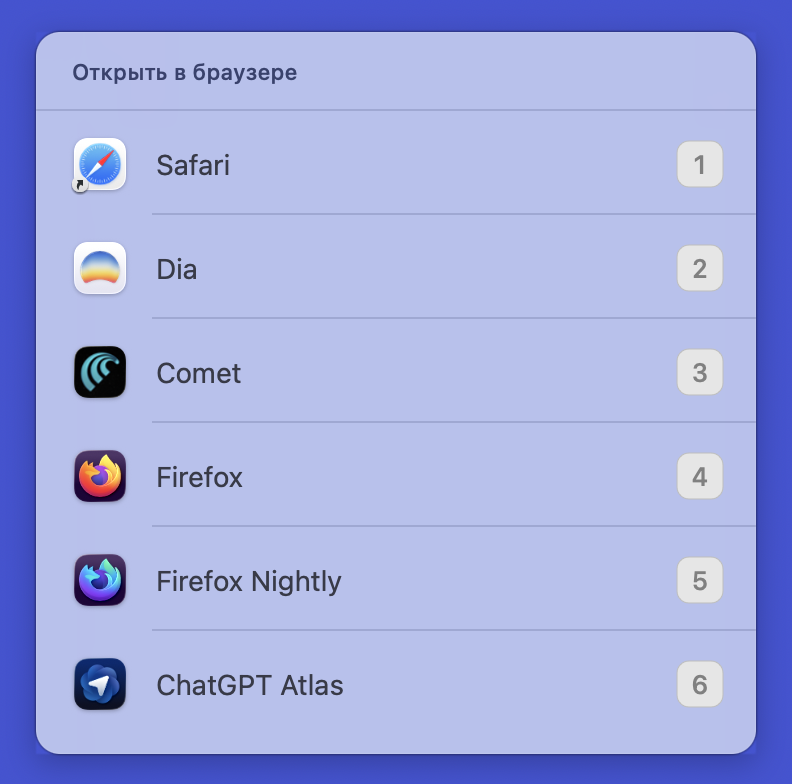
A focused set of features designed to eliminate browser choice friction. No bloat, no subscriptions, no Electron.
Press 1-9 to choose a browser instantly. No mouse needed, no delay. The overlay appears and disappears in milliseconds.
Define URL patterns and each link opens in the right browser automatically. No overlay, no prompt, no friction.
Pick the same browser for a domain 5 times and QuickBrowser remembers. Set autolearn=true for silent mode.
See how often each browser is used, split by manual picks versus automatic routing. Full transparency.
Manage browsers and patterns from the menu bar GUI, or edit the plain-text config file directly. Your choice.
A single ~2 MB native Swift binary. No Electron, no runtime, no frameworks. Just a small, fast app.
Set it up once, forget it exists. QuickBrowser handles every click after that.
Install QuickBrowser, set it as your default browser in System Settings. All link clicks now go through it.
Add your browsers and URL patterns to a simple plain-text config file, or use the built-in GUI editor.
Matched URLs open in the assigned browser automatically. Unknown URLs show the keyboard picker. Done.
No databases, no proprietary formats. A simple config file you can diff, grep, back up, and version-control.
#, empty lines ignored
# ~/.config/quickbrowser # Settings autolearn=true # Browsers 1=/Applications/Safari.app 2=/Applications/Firefox.app 3=/Applications/Google Chrome.app # Auto-routing patterns github.com 2 openai.com 1 stackoverflow 2
QuickBrowser is focused on fast link routing with a tiny native app. Here is how it compares.
| QuickBrowser | Browserosaurus | OpenIn | Choosy | |
|---|---|---|---|---|
| License | MIT | MIT (archived) | Proprietary | Proprietary |
| Price | Free | Free | $9.99 | $10 |
| Tech | Native Swift | Electron | Native | Native |
| App size | ~2 MB | ~150 MB | — | — |
| URL pattern rules | ✓ | ✓ | ✓ | ✓ |
| Auto-learning | ✓ | ✗ | ✗ | ✗ |
| Usage statistics | ✓ | ✗ | ✗ | ✗ |
| Config format | Plain text + GUI | GUI | GUI | GUI |
| Maintained | Yes | No (archived 2025) | Yes | Yes |
brew tap andreygaag/quickbrowser brew install --cask quickbrowser
Then set QuickBrowser as the default browser in System Settings → Desktop & Dock → Default web browser. If macOS blocks the first launch, run xattr -dr com.apple.quarantine /Applications/QuickBrowser.app.
git clone https://github.com/andreygaag/quickbrowser.git
cd quickbrowser/QuickBrowser
xcodebuild -project QuickBrowser.xcodeproj \
-scheme QuickBrowser \
-configuration Release \
clean build
cp -R ~/Library/Developer/Xcode/DerivedData/QuickBrowser-*/Build/Products/Release/QuickBrowser.app /Applications/
Requires Xcode and macOS 13.0+. After copying to /Applications, set QuickBrowser as the default browser in System Settings.